If you’re a small to medium-sized business (SMB) using your NetSuite to facilitate inventory management, you already have a solid foundation in place. But turning data into better inventory decisions requires more than historical reports and static reorder points. That’s where Netstock comes in.
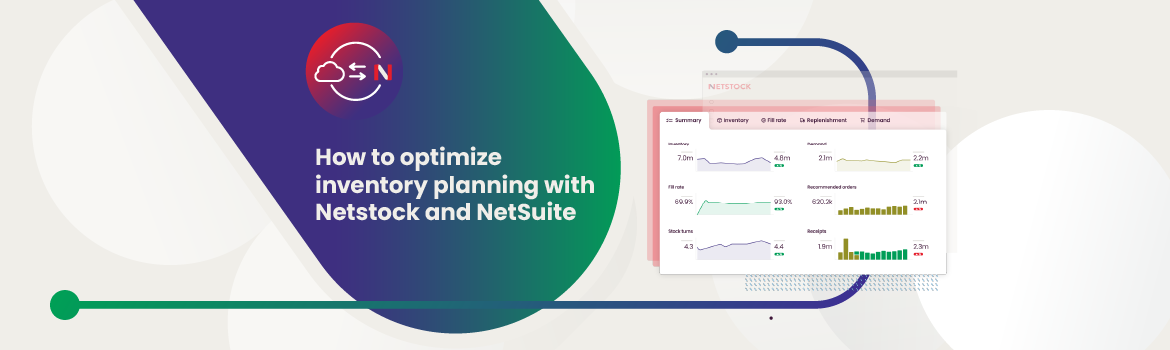
Netstock connects directly to NetSuite, layering intelligent forecasting, dynamic safety stock, and real-time visibility on top of your existing data. The result? You can respond to supply chain shifts faster, reduce excess inventory, and keep service levels steady, without customizing your enterprise resource planning (ERP) or having to manipulate tedious spreadsheets.
This guide covers how the integration works, what it unlocks, and why more SMBs are pairing NetSuite with Netstock to simplify supply and demand planning and scale their business more efficiently.
Key takeaways
- NetSuite is a powerful ERP, but it has inventory planning gaps that Netstock complements with forward-looking features.
- Without disrupting workflows, SMBs using NetSuite can reduce excess inventory, improve service levels, and simplify planning by integrating Netstock.
- Integration is fast (typically live in under 45 days) with minimal IT effort required, making it accessible even for lean operations.
- Real-world SMBs using Netstock with NetSuite report results like 30% less excess stock, 98% fill rates, and faster forecasting, demonstrating measurable ROI.
Why SMBs need more than just an ERP for inventory optimization
NetSuite is a powerful ERP system, and its strengths lie in organizing and reporting on historical data. However, when demand patterns shift, supplier lead times change, or stock-outs creep in, static planning tools aren’t the most helpful.
Today’s supply chain volatility and tighter cash flow pressures mean SMBs need more from their systems. A 2020 report estimates that more frequent supply chain disruptions are expected in the future. Affecting all industries, these events are estimated to occur every 3.7 years and last at least a month.
This means that successful businesses need planning tools that look forward, help avoid inventory missteps before they happen, and adapt rapidly when disruptions occur.
Inventory optimization solutions with forward-looking features, like Netstock, satisfy these demands. By integrating directly with NetSuite, they enable more accurate forecasting, smarter safety stock settings, and more. With historical data and data-driven predictions on their side, inventory and supply chain professionals can make decisions faster.
Understanding NetSuite’s inventory capabilities
NetSuite provides a solid foundation for managing inventory. It captures transactional data well, supports multi-location inventory tracking, and offers basic tools for replenishment. For businesses focused on standard order management workflows, NetSuite can deliver consistency and visibility across departments.
When it comes to forward-looking planning (anticipating future demand, settling dynamic safety stock levels, or identifying exceptions before they become problems), NetSuite has limitations. Its native tools are based on static rules and averages, which can fall short in environments where variability and complexity are the norm.
That’s where many SMBs start to feel the gap. Despite its strengths, NetSuite wasn’t designed to support advanced planning scenarios or predictive inventory optimization out of the box. As a result, teams often turn to spreadsheets or custom reports to bridge the divide. Unfortunately, this only adds manual effort and introduces the risk of human error to crucial inventory management processes.
By understanding where NetSuite’s strengths end and where its limitations begin, businesses can make more strategic decisions about how to augment and add to it.
What NetSuite does well
- Centralizes inventory and order management
- Tracks stock across multiple warehouses and locations
- Supports basic MRP and reorder point logic
- Generates historical reports for sales and purchasing
- Connects data across financials, supply chain, and CRM
NetSuite’s gaps
- Forecasting is limited to a few basic algorithms
- No built-in predictive demand modeling
- Safety stock settings are not responsive to change
- Lacks SKU classification for prioritizing inventory decisions
Why Netstock is the ideal NetSuite integration for predictive inventory optimization
The Netstock NetSuite integration: Not a replacement. A focused layer that builds on what’s already working.
Where NetSuite handles transactions and historical reporting, Netstock brings planning capabilities that help teams make faster, more informed inventory decisions.
By connecting directly to your ERP data, the Netstock NetSuite integration adds functionality that goes beyond averages and manual workarounds. It enables flexible demand planning, predictive forecasting, adjusts safety stock based on changing conditions, and highlights exceptions before they turn into problems. For SMBs, this kind of responsiveness can be the difference between reacting too late or planning with clarity.
Netstock also provides better visibility into what matters. With automated classification tools and intuitive dashboards, planners can focus their time on the SKUs and suppliers that impact performance the most – without digging through spreadsheets.
Working together, these capabilities help close the planning gap in NetSuite and give SMBs access to decision support tools that are usually out of reach without complex customization.
Forecasting & demand planning
Netstock’s forecasting engine uses statistical models that adapt to different demand patterns. This lets planners choose models that match the behavior of each SKU, rather than rely on a one-size-fits-all average.
Dynamic safety stock & service level optimization
Instead of fixed safety stock levels, Netstock calculates buffers based on supply and demand variability. Users can adjust target service levels by item or category, helping strike the right balance between availability and cost.
Inventory classification & exception management
Netstock classifies SKUs by value and velocity, helping teams prioritize high-impact items. Exceptions are flagged automatically – late orders, stock-outs, overstock – so planners can respond quickly and focus on what needs attention.
Netstock NetSuite integration: How the two systems work together
Netstock is designed to sit neatly alongside NetSuite – not to compete with it, replace it, or complicate it. Netstock enhances your existing ERP. The integration uses NetSuite’s existing data to power Netstock’s planning engine, allowing users to work with forward-looking insights while keeping NetSuite as the system of record.
Because the integration is built with SMBs in mind, it’s straightforward. Data flows securely from NetSuite into Netstock, syncing key information like sales history, purchase orders, inventory levels, supplier details, and lead times. That data is then used to generate forecasts, optimize replenishment, and surface exceptions without duplicating records or disrupting workflows.
For supply chain and planning teams, the Netstock NetSuite integration delivers a practical upgrade. You gain predictive functionality without the need for custom development or a complete process overhaul.
Technical integration overview
- Secure, real-time data syncs between NetSuite and Netstock.
- The integration uses NetSuite’s API and standard data fields, eliminating the need for custom coding.
- Netstock also allows users to export data and reports back into NetSuite or external systems if needed.
User experience (UX)
Netstock is web-based and designed for ease of use. Once connected to NetSuite, users can access dashboards, reports, and planning tools in Netstock’s interface without needing to constantly toggle between systems. It’s intuitive enough for planners to use every day and powerful enough to support strategic inventory decisions.
Real-World Use Cases: Inventory optimization with NetSuite and Netstock
For SMBs, improving inventory performance isn’t just about finding the right tool. It’s about finding a tool that fits. Netstock’s integration with NetSuite has helped businesses across industries gain clarity, control, and consistency in their planning. Below are three examples that show how SMBs have used the Netstock NetSuite integration to solve real problems.
Reducing excess inventory in record time
Adventure Operations, an international wholesale outdoor leisure company with a large SKU count, struggled to organize inventory and plan proactively with spreadsheets. The extensive Excel spreadsheets often crashed and lost data. The team needed a solution.
With Netstock connected to NetSuite, the company quickly identified which items were overstocked and which were at risk of running out. This clarity allowed the team to reduce excess inventory by over 30% in under 12 months.
Benefiting from a supply chain makeover
With 500 active SKUs and 24 lines of business, ILIA Beauty faced manual inventory management challenges that led to major forecasting inefficiencies. The brand produces over 12,000 unique forecasts each month – way too much to handle in Excel. By adding Netstock to its NetSuite setup, ILIA’s team gained access to automated forecasting insights and better tools for managing variability. Ultimately, this integration helped the beauty brand reduce panic ordering and improve the fill rate from 92% to 98%. Plus, a forecasting process that used to take four hours now only takes the business 15 minutes.
Improving visibility and forecasting success across locations
Not long ago, Shimano, a North American bicycle brand, didn’t have the visibility it needed to optimize production, replenishment, and respond to changing demand. Investing in Netstock, which integrated seamlessly with their NetSuite Oracle ERP, the brand was able to massively scale its operations. Better inventory planning improved their responsiveness on Amazon’s marketplace. Improved forecasting made it easier to optimize inventory levels. What made this investment even sweeter is that “It only took about a month to integrate Netstock with our Oracle ERP system, and our planning immediately became more agile,” said Rick Barrosa, Sr. Manager of Supply Chain.
Strategic benefits for SMBs
For small to mid-sized businesses, balancing inventory and cash flow is rarely straightforward. Integrating Netstock with NetSuite gives supply chain teams a sharper lens and faster path to better decisions. With more visibility and control, SMBs can operate with the kind of precision typically reserved for larger enterprises.
Key benefits include:
- Reducing working capital tied up in slow-moving or excess stock
- Improving fill rates and customer service levels
- Aligning inventory planning across multiple warehouses, channels, or markets
- Gaining transparency into supplier reliability and lead time variability
- Enabling teams to scale operations without adding manual effort
The result is a planning process that’s more responsive, more efficient, and better aligned with business growth.
Implementation tips: How to get started
As Shimano proved, getting up and running with Netstock doesn’t require a major system overhaul. For NetSuite users, the process is straightforward. Most businesses are live within a few weeks.
Here’s what a typical implementation looks like:
- Kickoff & discovery: Identify goals, review your existing inventory data, and map out priorities.
- Integration & setup: Netstock connects directly to NetSuite using secure APIs. Your item, location, and transaction data syncs automatically.
- Configuration & validation: Tailor Netstock’s settings to fit your inventory policies, classification strategies, and planning preferences.
- Training & early use: Your team begins working in the system with support from Netstock resources and guidance tailored to their roles.
- Go live & optimize: With inventory visibility in place, you’ll start identifying quick wins and refining your planning process.
Together, these steps lay the groundwork for a planning workflow that complements NetSuite and grows with your business.
Typical timeline
Netstock’s implementation is designed to move quickly and minimize disruption. Most small to mid-sized businesses are fully operational within 30-45 days. Here’s how that typically breaks down:
Pre-implementation (Week 1)
This phase focuses on aligning expectations and auditing current data. It includes identifying gaps, clarifying goals, and determining the most effective setup based on your planning priorities.
Integration & Configuration (Weeks 2–3)
Netstock connects directly to NetSuite via API, pulling in historical item, supplier, and transaction data. Configuration happens in parallel – adjusting forecasting models, service level targets, and inventory classifications to match business needs.
Training & Team Usage (Week 3 and beyond)
Once the system is populated and configured, Netstock provides guided training for planners, buyers, and anyone else involved in inventory decisions. Teams are typically live and using the platform by the end of week three, with continued support as they adopt and refine workflows.
Key roles involved
The implementation process isn’t limited to IT. Because Netstock supports cross-functional inventory decision-making, it’s helpful to bring in stakeholders from:
- Supply chain and operations: To define planning priorities, stocking strategies, and replenishment rules.
- Finance: To align inventory policies with cash flow targets and budget considerations.
- IT: For initial setup and integration support (usually minimal due to Netstock’s API-based connection).
- Procurement: To ensure vendor lead times, MOQs, and ordering constraints are built into the planning logic.
Cross-team input helps ensure that the system reflects how your business actually operates – and not just how it looks on paper.
Quick wins to look for
Even before the first full cycle is complete, businesses can look for initial success in a few key areas:
- Visibility into problem SKUs
Planners can immediately identify overstocked, understocked, or high-risk items using Netstock’s dashboards. - Smarter replenishment
Instead of chasing stock-outs or relying on static reorder points, teams can begin placing smarter orders based on forecasted need and service level targets.
- Cleaner planning process
Exception reports and classification tools help focus attention where it’s needed most – removing noise and manual guesswork from routine tasks.
These improvements lay the foundation for longer-term gains in working capital, customer service, and operational agility.
Final thoughts: Future-proofing inventory planning for SMBs
Inventory decisions can’t just reflect what happened last quarter. They need to anticipate what’s coming next. For small to mid-sized businesses using NetSuite, pairing it with Netstock offers a practical way to future-proof inventory planning without overhauling core systems.
Together, these tools give SMBs the ability to respond faster, plan smarter, and adapt confidently to change. That means fewer stockouts, less capital tied up in excess inventory, and more time spent on strategic decisions rather than spreadsheet firefighting.
The result? A leaner, more resilient supply chain – and a team empowered with the visibility and control they need to grow.