Adopting a new inventory management solution can feel like a big leap…especially if you’ve been running on spreadsheets or legacy systems for years. But it doesn’t have to be stressful.
Netstock, a leading supply and demand planning solution, is designed for a smooth, structured onboarding experience that gets you live quickly, teaches your team how to use the solutioneffectively, and delivers measurable improvements right away. With expert guidance at every step, you’ll never feel like you’re figuring things out on your own.
In this guide, we’ll walk you through the entire Netstock onboarding process. We’ll explore everything from your first login to your first inventory wins, so that you know exactly what to expect, what’s expected of you, and how to get the most value in your first 90 days.
Our goal is to reduce the overwhelm that comes with inventory software training. Netstock’s guided onboarding process helps teams go live quickly with expert support and minimal disruption. This approach ensures that you see results fast while building the confidence your team needs to succeed long-term.
In this guide
You’ll discover:
- What new users can expect from Netstock onboarding
- Step-by-step breakdown of the implementation journey
- What you’ll learn during inventory software training
- How Netstock accelerates time-to-value
- Tips to set your team up for long-term success.
Netstock onboarding overview: What to expect from day one
When you become a Netstock customer, you’re assigned a dedicated onboarding specialist. This individual serves as your personal guide. They’ll be in charge of getting the system fully set up and tailored to your business.
Most teams are fully operational in 30–45 days, but the actual timeline depends on how quickly your team can provide initial data and review key decisions. The process is milestone-driven, meaning you’ll always know where you are in the journey. Plus, if you have questions along the way, your onboarding specialist is there to help.
Here’s what you can expect:
- Minimal IT effort: most ERP connections take under an hour.
- Hands-on guidance: your specialist walks you through each step, often sharing their screen and showing you exactly what to do.
- Customer-friendly pacing: onboarding sessions are short, focused, and spaced out to prevent overwhelm.
- Training built in: you learn the software as you set it up, so the concepts stick.
By the end of onboarding, your data will be clean and live in Netstock, your replenishment parameters will be configured, your team will be trained, and you’ll have already begun making better inventory decisions. Unlike other software implementations that can drag on for months, Netstock’s proven process gets you seeing value in weeks, not months.
“Netstock has been unquestionably the best software implementation we’ve experienced. The process was well managed, and the results have been fantastic.” Tim Edmondson, Managing Director, Edgar Edmonson, Australia
Who should be involved in onboarding?
Having a dedicated team tasked with onboarding and implementing new software goes a long way in terms of large-scale adoption across your organization. When getting started with Netstock, we recommend choosing your internal onboarding team thoughtfully. We’ve seen customers have the most successful onboarding experience when they establish individuals with the following key roles and responsibilities:
| Your internal onboarding team | |
| Primary roles | Key responsibilities |
| Executive Sponsor | This individual’s primary responsibility is to identify and communicate the benefits of the project, building support for change internally. They also make sure the right people are assigned to the project for the highest level of success. |
| Project Champion/Custodian | Appointed by the Executive Sponsor, this individual drives the adoption and effective use of Netstock with all stakeholders. Often, this person works as a change manager, project manager, and super-user of the app. |
| Inventory Planners/Buyers | These team members are responsible for forecasting and planning inventory to meet business needs and goals. That means they’ll be using Netstock the most and must trust the data and recommendations it delivers while being able to critically analyze the information it provides. For these reasons, getting planners/buyers involved on Day 1 is crucial. |
Step-by-step Netstock onboarding process
Before you get started
Preparation for adoption builds the foundation for smooth onboarding and user engagement. A change management mindset can help your team be even more successful when learning how to use Netstock.
Change management is the process of selecting a specific approach to preparing and supporting individuals and teams at your business when making an organizational change. In a business environment, it is a structured approach to transitioning people and processes from the current state to a desired future state. The mindset is people-focused, outcome-driven, and adaptable to minimize resistance.
Once you’ve established this attitude with all key stakeholders, you’re ready to start onboarding. And if you’re not sure how to get in the mindset, don’t worry. Netstock can help with that, too.
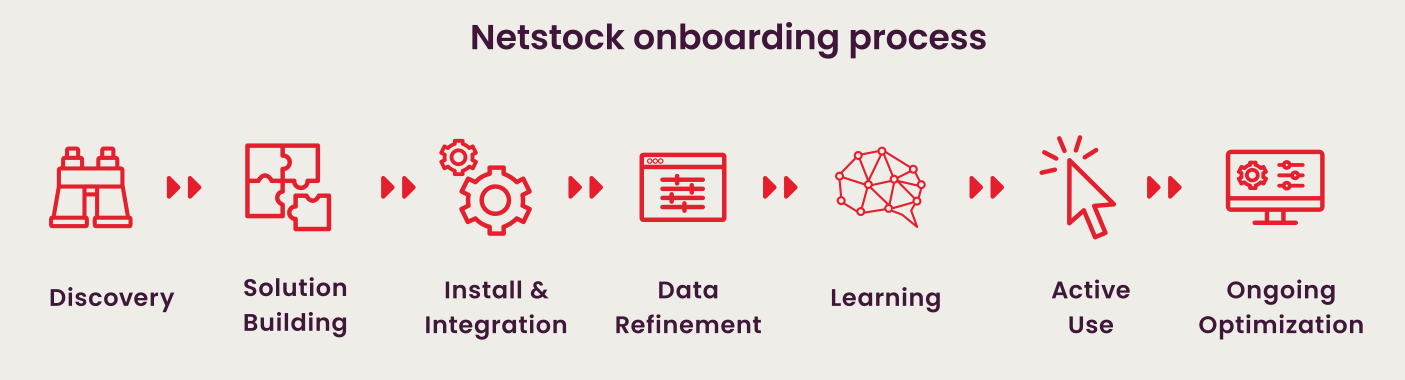
Step 1: Connect your ERP
Integration is the first step, and Netstock makes it painless.
Your onboarding specialist will help you connect your ERP or accounting system. Netstock integrates seamlessly with 60+ learning ERPs through prebuilt connectors and lightweight APIs that require minimal IT involvement.
What this step looks like in practice:
- Your IT team spends ~30–60 minutes authorizing the connection.
- Netstock pulls your core inventory data automatically.
- You confirm that the first data sync went smoothly.
Step 2: Initial data load and validation
Once connected, Netstock imports key datasets:
- Item master (SKUs, descriptions)
- Supplier information
- Warehouse and location data
- Historical sales and purchasing data
- Current on-hand quantities
The solution automatically flags and cleans common data issues such as missing lead times, duplicate SKUs, or incorrect supplier codes. You’ll then review the cleaned data with your onboarding specialist to ensure accuracy.
Step 3: Define inventory policies
Inventory policies are your rules for how stock should be managed – and they shape every recommendation Netstock makes.
In this step, you’ll:
- Set service level targets (e.g., 95% availability for top products)
- Define ABC classifications to prioritize high-impact items
- Set or review supplier lead times
- Align policy settings with company goals (reduce excess, prevent stockouts, optimize cash flow)
Step 4: Training and user setup
Training happens alongside configuration so that your team learns in real time.
Role-based training ensures:
- Planners know how to use replenishment reports.
- Buyers know how to approve and place orders.
- Managers know how to read dashboards and track KPIs.
“I wasn’t part of the original onboarding, but it was easy to jump in and start using the system,” said Laurette Elling, a buyer at Volero. “I explored the AI tools on my own and was immediately able to make more informed purchasing decisions.”
Step 5: Review and refine recommendations
Now the system starts to show its value.
You’ll work with your onboarding specialist to:
- Review Netstock’s suggested orders.
- Fine-tune settings for accuracy.
- Override forecasts where needed (e.g., seasonal adjustments).
Step 6: Go live and measure results
Going live means Netstock becomes your team’s daily planning tool.
Early days after launch often include:
- Running Netstock reports in parallel with your old process for reassurance.
- Checking alerts and exceptions daily.
- Tracking KPIs like stock value, fill rate, and turnover.
Within just a few weeks, most customers have enough data to measure impacts such as reduced stock-outs, lower inventory holding costs, or faster order cycles.
“I have worked on numerous platforms, plug-ins, and some personally constructed systems, and haven’t come across anything so cleverly compiled with such a phenomenal balance between the detail and the “big picture”. Add the ease of onboarding and navigation, and the efficiencies created, and it’s a no-brainer” comments Brett Wakeley, Head of product and procurement at TraffiGlove.
Post-implementation support
Netstock training goes beyond initial onboarding. Once on the platform, your team will have access to a wealth of resources, customer-specific training, webinars, support channels, and more.
What users learn during Netstock training
Netstock training goes beyond button-clicking. Our team helps your team think differently about inventory. Coming away, you can expect stakeholders and users alike to know how to use Netstock and how to optimize inventory management more efficiently for better business results.
Key topics included in training:
- Forecasting & demand planning: How to trust the numbers and adjust for exceptions.
- Inventory classification: Why different SKUs deserve different policies.
- Replenishment best practices: Interpreting order suggestions and acting with confidence.
- Dashboard navigation: Turning KPIs into actionable insights.
- Workflow management: Setting alerts, running reviews, and collaborating across departments.
All sessions are recorded, and the Netstock Learning Academy offers video tutorials, knowledge base articles, and quick reference guides for ongoing learning.
“Our team received invaluable knowledge, allowing us to bridge gaps in our understanding. The Netstock Certification exam was a great eye-opener, spotlighting areas where we needed improvement.” Nick Colebatch, Inventory and supply chain analyst – Tradeware – AUS
Tips for onboarding success: Maximize your first 90 days
To get the best results from your onboarding period:
- Assign an internal champion: This is a go-to person for Netstock questions.
- Set clear success metrics: Some examples are “reduce excess stock by $100K” or “increase fill rate to 98%.”
- Keep the momentum: Book weekly or biweekly check-ins with your onboarding specialist until go-live.
- Trust the data: The system’s recommendations are only as good as the information you provide. Trust your existing data and make sure it’s solid for optimal success.
- Engage early with support: Questions answered quickly prevent bottlenecks.
Final thoughts: Confident, fast-start inventory optimization with Netstock
Switching to a new inventory management solution can be daunting, but with Netstock’s guided onboarding, it’s a streamlined, supportive process that builds confidence from day one. Within weeks, you’ll be making smarter decisions, reducing risk, and freeing up cash.