
CONTAINER BUILDER MODULE
Build container-ready orders in minutes
Automatically turn Netstock recommendations into shipment-ready supplier orders. With a single click, pack multiple containers using real-world constraints like volume and weight. Saving you hours of manual work and reducing costs.
Request a demo
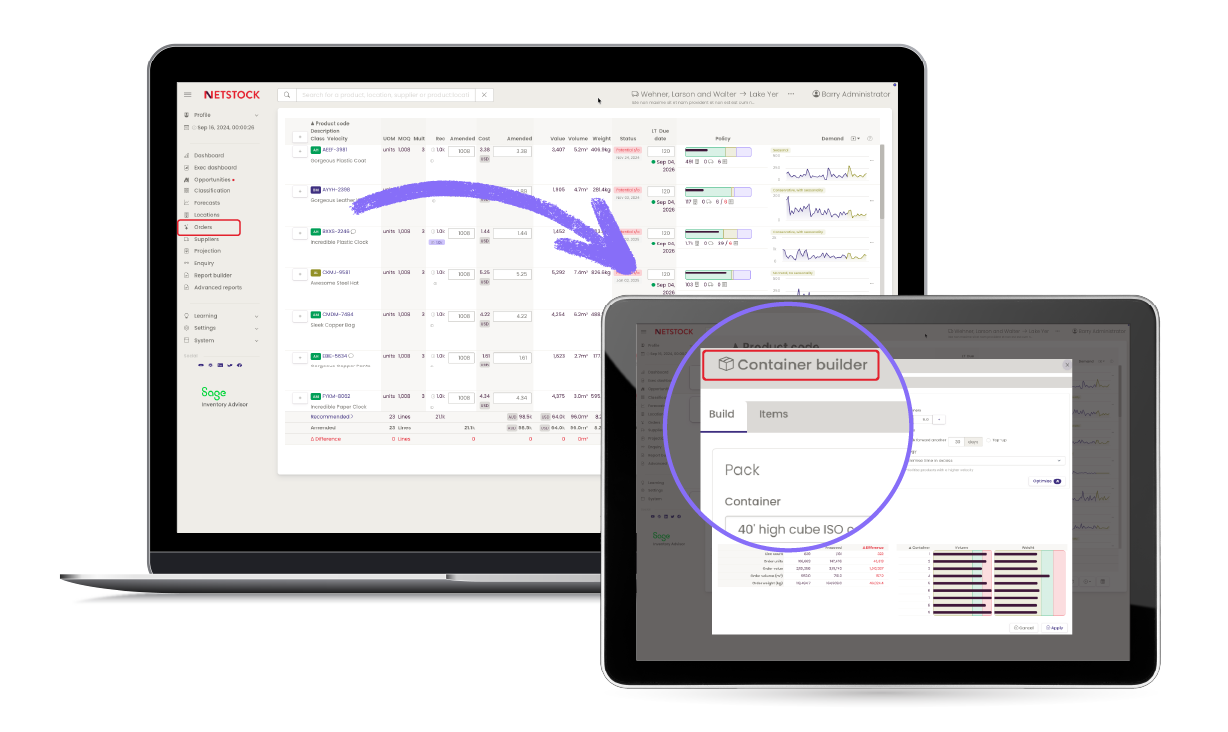
Make every shipment count

Save hours of manual work
Replace spreadsheet-based container packing with fast, automated order building

Reduce freight costs
Maximize container utilization and avoid paying to ship empty space

Build shipment-ready orders faster
Turn recommendations into supplier-ready orders in minutes, with no rework required

Eliminate guesswork
Automatically select the right items based on volume, weight, and your business priorities

Stay in control
Optimize orders based on cost, margin, or efficiency goals
How Container Builder optimizes every order
Once an order is created, Container Builder automatically optimizes for container-ready shipping.
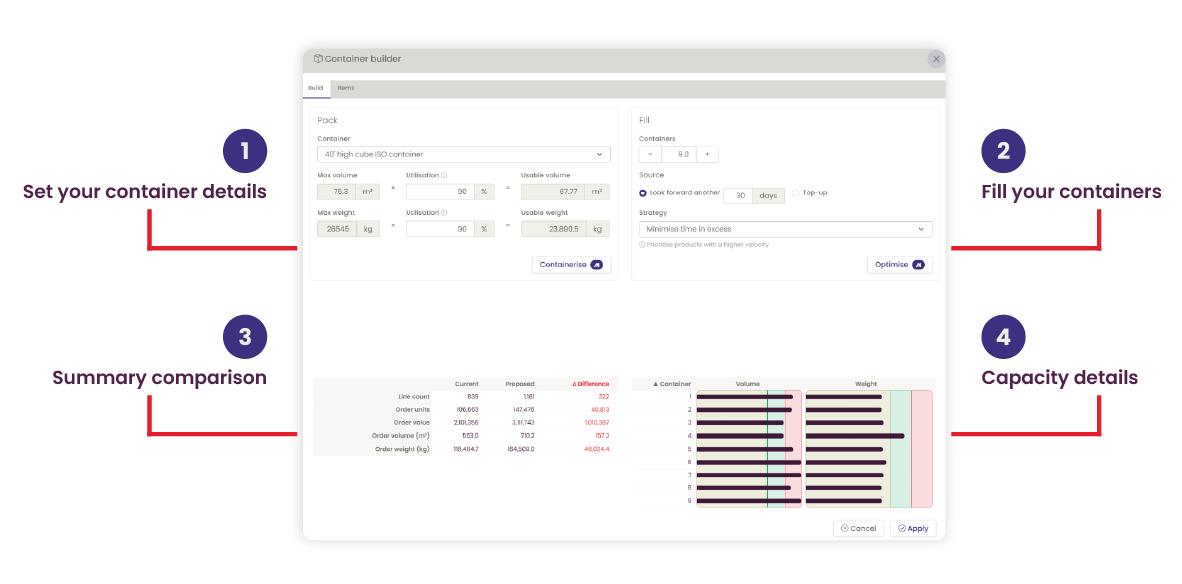
- Automatically pack orders into containers based on volume and weight
- Instantly see remaining container capacity in real time
- Set your target number of containers and adjust accordingly
- Apply optimization strategies based on cost, margin, or efficiency goals
SEE IT IN ACTION
Watch how easy it is to bridge the gap between optimal order recommendations and real-world shipping constraints.

One platform. Clear visibility. Smarter decisions.
Plan, order, and optimize inventory with confidence using Netstock’s AI-powered supply and demand planning solutions.
 Inventory
  Inventory
  Inventory
  Supplier
  Demand
  S&OP
S&OPFAQs about Container Builder Module
Container Builder bridges the gap between optimal order recommendations and real-world shipping constraints. It enables users to build supplier orders that fit within container limits: based on volume, weight, and capacity. The outcome? Shipments are fully optimized before they’re placed. Instead of shipping excess “air” or the wrong mix of products, customers can prioritize the right items, adjust orders using defined optimization strategies (like maximizing margin or minimizing excess), and finalize container-ready orders that reduce costs, limit waste, and improve overall procurement efficiency.
The system applies intelligent optimization strategies to make the best use of available space. Whether your goal is to maximize utilization, reduce excess, or prioritize key items, it adjusts the order to match your priorities.
Yes. Whether your focus is reducing costs, increasing margins, or improving container efficiency, the system automatically adjusts your order to match that goal. You can optimize using different strategies, including:
- Minimizing time in excess stock
- Maximizing revenue while reducing excess
- Prioritizing smaller products to fill space efficiently
- Prioritizing lighter products to optimize weight constraints
Once selected, Container Builder automatically adjusts order quantities and container fill to align with your chosen strategy, so every shipment reflects your business objective without manual rework.
Absolutely. You can refine allocations at the item level before finalizing your order, giving you full control while still benefiting from automation.
Yes. Container Builder learns from previous supplier behavior and order patterns, helping streamline and improve future container builds.
Orders can be exported as a single shipment or split per container, depending on your ERP and supplier requirements.
Yes. You can use standard container sizes or define your own, including volume and weight limits. You can also assign default container settings per supplier.
It removes the manual effort of building container orders while ensuring every shipment is optimized for space, cost, and efficiency. This saves you time and reduces any unnecessary costs.
